bbPress Members Only is a simple & quick & light bbPress Members Only solution, it help you to make your bbPress site only viewable to logged in member users. It is super easy to use, just activate the plugin, follow detailed guide of each option to finish a little setting work in admin panel, the plugin will protect your bbPress and wordpress perfectly. If you do not set up it in back end, it works well too, it is admin friendly.
Features of bbPress Members Only Pro
# Restricts Your bbPress and WordPress to logged in/registered members only
# Support bbPress sub forums visibility control, you can opt to hide / show any bbPress sub forums from bbPress forum main index page, based on user roles
# Restricts your bbPress forums to Logged in/Registered members only, you can choose which sub forum will open to guest user, or which sub forum will only opened to logged in users
# Restricts your bbPress topics to Logged in/Registered members only.
# Restricts your bbPress replies to Logged in/Registered members only.
# Restricts your bbPress forums based on user roles.
# Restricts your bbPress topics based on user roles.
# Restricts your bbPress replies based on user roles.
# Options to enable / disable restriction of your bbPress Topics, bbPress Replies, WordPress Pages / Posts
# Opt to remove topics of specific bbPress forum from search engine to protect users’ privacy
# In bbPress Topic editor, bbPress reply editor, post / page editor, you can choose set up it as a members only page based on user roles.
# Charge bbPress forums membership fees with bbPress WooCmmerce Payment Gateway Plugin
# Supported https and websocket
# Login and Logout auto redirect based on user roles
Restricts your bbPress to logged in/registered members only
Only registered/logged in users can view your site, by default, non members can only open home page / forums archive / login / register / lost password pages. Logged in users have full access.
If a user who did not logged in your site, he can open home page, but when he try to view any other content in your site, he will be redirected to optionally URL which can be set up in admin panel.
If you want more pages opened to non members users, you can enter page URLs in ‘Oopened Page URLs’ option, you can add any urls (enter one URL per line please) which opened to public, guest can view content of these opened post / pages / stores… and so on, when they view these opened pages, they will not be redirected to register page, else they will be redirect to your pages which you set up in admin area, for example, register page or store page or membership payment page… and so on.
Restricts bbPress forums to users based on user roles
We support restricts bbPress forums to users based on user roles. You can set up which bbPress forum opened for Non-Members / Guest users, and which bbPress forum opened for logged in users based on user roles, for example:
1: You can opt to allow Non-Members / Guest users only open newbie forum, but they can not check support forum or paid customer forum.
2: You can opt to subscriber users can open newbie forum and support forum, but they can not open paid customer forum.
3: You can set up paid members can open newbie forum and support forum, and they can open paid customer forum
4: … and so on
It is very easy to restricts bbPress forums with bbPress members only plugin, with a few clicks in two minutes:
#1 Login WordPress back end
#2 Click “bbPress Members Only” menu
#3 Click “Forum Restriction sub menu” item
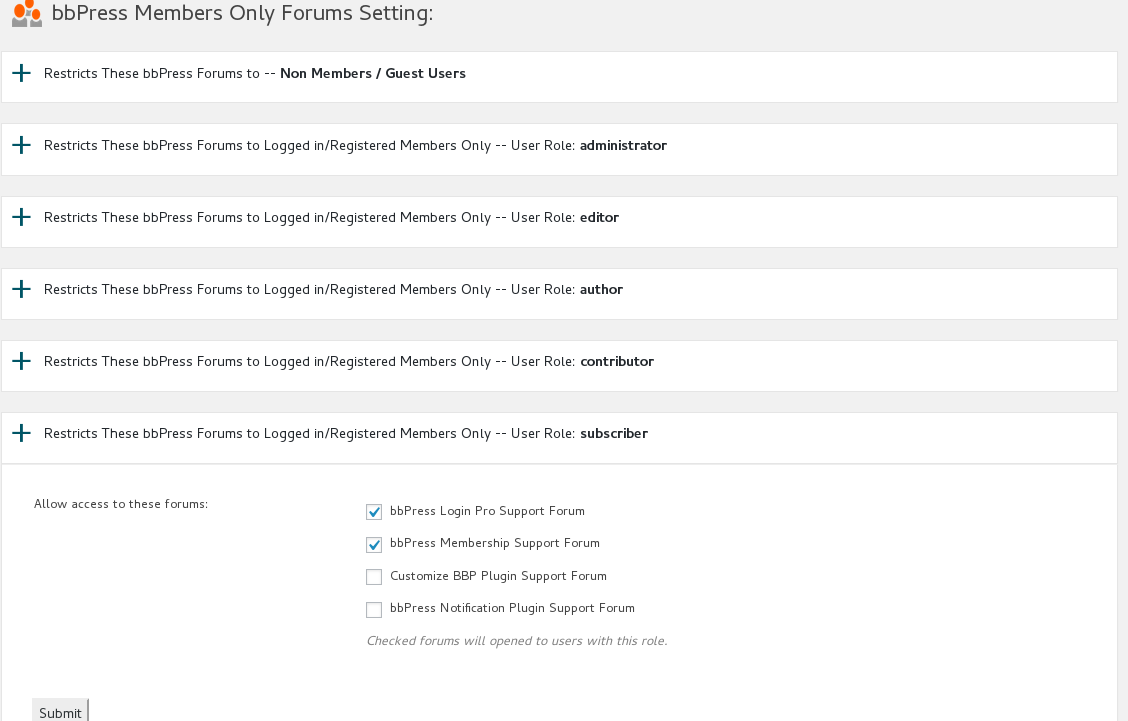
#4 You will open “bbPress Members Only Forums Setting” panel, it looks like this:
restrict bbpress forum
You will find user roles lists, just click one user role’s tab, you will find bbPress forums lists, just checked bbPress forum which you allow be opened by that user role, and click “Submit” button, then in front end, the selected bbPress Forums can be opened to the user role which be assigned with these bbPress forums.
When Non-members user roles try to open these bbPress forums which did not be assigned to their user roles, then will be redirected to the landing page or register page which you settings in back end 🙂
Enable page level protect
If you enabled page level protect option, when you edit page / post / product / video… and so on, you will find ‘members only for this page?’ meta box at the right top of the wordpress standard editor.
If you checked ‘allow everyone to access the page’ checkbox in the meta box, the post will be opened to all guest users, by this way, you do not need enter page URLs to Opened Pages Panel always.
Enable Forum Topics Protect
If you enabled forum topics protect option, when you edit bbPress Forum Topics, you will find ‘members only for this page?’ meta box at the right top of the wordpress standard editor.
In the meta box, you will see all user roles, and you can select which user roles can open / see the topic, please remember click wordpress editor publish / update button to save your settings.
Forum Topics restriction priority above the forum restriction , for example, you can set up a sub forum opened to guest, and setting a few topics in the sub forum can only viewed by customer user role or paid member user role and so on.
Enable Forum Replies Protect
If you enabled replies protect option, when you edit bbPress Forum replies, you will find ‘members only for this page?’ meta box at the right top of the wordpress standard editor.
In the meta box, you will see all user roles, and you can select which user roles can open / see the topic, please remember click wordpress editor publish / update button to save your settings
Forum Replies restriction priority above the forum restriction, For example, you can set up a sub forum and topics in the sub forum opened to guest, but set up the reply can only viewed by customer user role or paid member user role and so on
Support bbPress Sub Forums Visibility Control
You can hide / remove any bbPress sub forums from bbPress main index page, based on user roles, for example, you can opt to just allow guest users view your “user question” sub forum in bbPress main index page, but hide “Support” sub forum to guest user roles in bbPress main index page, then you can show “Support” sub forum to customer user roles in bbPress main index page, also hide “Staff” sub forum to customer users… and so on
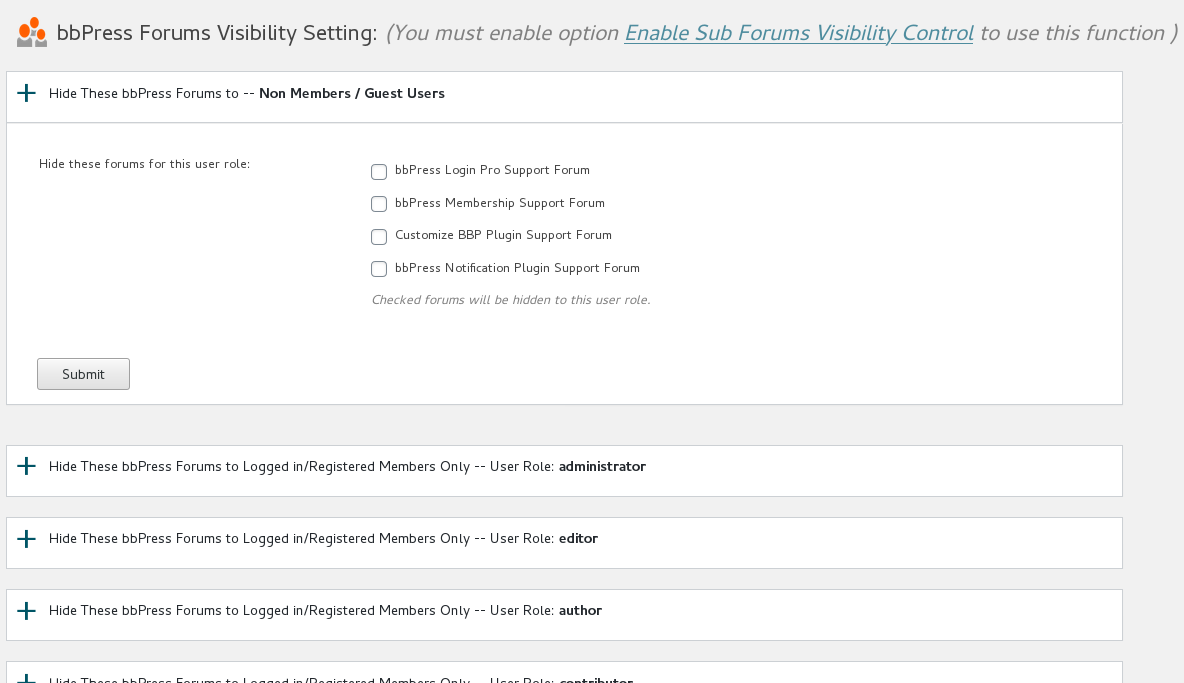
In the “bbPress Forums Visibility Setting” panel, you will find we have listed all user roles for you, you can just click any user roles tabs to hide any sub forums in bbpress forum main index page, it looks like this:
bbpress forums visibility settings
you can opt to hide / show any bbPress sub forums to users based on user roles
Charge bbPress forum membership fees from bbPress forum access
Once activated bbPress WooCommerce Payment Gateway Plugin, you will find menu item “bbPress WooCommerce” in admin area.
If you click “bbPress WooCommerce” menu, you will find “Enable bbPress WooCommerce Payment Gateway” panel in where you can enable bbPress Membership WooCommerce Payment Gateway.
#1 If you checked “enable bbPress Membership WooCommerce Payment Gateway” option, When you add / edit woocommerce products, you will find new tab “bbPress Payment” under “Product data”.
#2 If you click “bbPress Payment” tab, You will find we have listed all user roles in “Membership Role” dropdown box, you can assign any user role to this product.
#3 Once user completed the order for this product, we will assign selected user role to paid customers automatically, this means you can charge membership level fee via woocommerce products.
#4 If you cancell users order in woocommerce order manager, we will remove user membership role.
#5 If you refund users order in woocommerce order manager, we will remove user membership role too.
#6 In bbPress Members Only Pro Plugin, you can enable / disable bbPress forums restriction for each user roles, for example subscriber users can open pre-sale forum, but customer user role can do more things — open support forums… and so on.
Login and Logout auto redirect based on user roles
you can set up after login redirect URLs and after logout URLs based on user roles. For example, you can set up users which have
subscriber role redirect to newbie sub forum after they logged in, and let users who have woocommerce customer role redirected to support sub forum,or redirect editors to manager sub forum.
This feature is very easy to use, please logged in your admin area, open bbPress Members Only menu, click redirect setting sub menu item,
you can find we have listed all roles automatically, just select user roles, and select redirect method from 3 redirect method:
1: Default, this means do nothing and just follow buddypress and wordpress default behaviour.
2: Referer, this means after logged in, user will be redirect to the same page before login
3: Redirect to Certain URL, you can enter any page URL in your domain, users which have related roles will be redirected to this URL after they logged in.
Opt to remove topics of specific bbPress forum from search engine to protect users’ privacy
Support remove topics in specific bbpress forums from search engine.
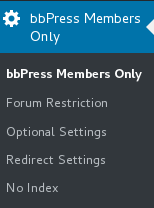
In back end, you will find the menu item “No Index”,it looks like this:
bbpress membership menu items
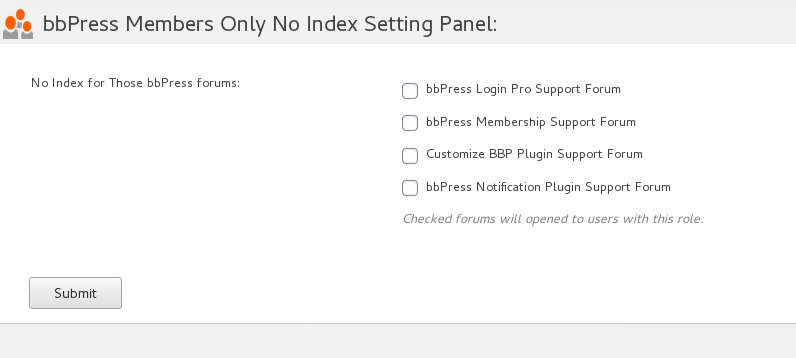
if you click “No Index” menu item, you will open bbpress Members Only No Index Setting Panel, it looks like this:
bbPress Members Only No Index Setting Panel
In bbpress Members Only No Index Setting Panel, you can select to remove any forum & topics of specific bbpress forums from search engine.
Support HTTPS / HTTP
Our plugin will detect your site is use https or http automatically and works well for both of HTTPS and HTTP.
More amazing features is be developing, also there are many feature in To-Do lists, if you hope more features, contact us and any feature request is welcome.
Just $12, you will have a powerful bbPress Members Only Pro plugin, Unlimited Download, Lifetime Upgrades, Ticket Support
bbPress Membership Plugin Change log
= bbPress Membership Plugin 2.8.2 =
1: Improve the compatibility of bbpress membership (login / logout) redirection feature with other plug-ins.
2: Support WordPress 5.5.1 and bbPress 2.6.5
= bbPress Membership Plugin 2.8.0 =
Support bbpress in buddypress site
= bbPress Membership Plugin Version 2.7.2 =
Support bbPress sub forums visibility control
In back end, please click optional settings sub menu, you will find new option box “Enable Sub Forums Visibility Control”
If you enabled “Enable Sub Forums Visibility Control”, in back end, please click bbpress members only menu, you will find new sub menu “Forum Visibility”
If you click the sub menu “Forum Visibility”, you will open bbPress Forums Visibility Setting panel
In the “bbPress Forums Visibility Setting” panel, you will find we have listed all user roles for you, you can just click any user roles tabs to hide any sub forums in bbpress forum main index page.
If you want all sub forms show to all users in the bbPress forum index page, just disable option “Enable Sub Forums Visibility Control” in “optional settings” sub menu
Also we have a few tweak in codes of bbpress membership plugin
= bbPress Membership Plugin Version 1.7.2 =
fixed the bug of topic / reply access control
= bbPress Membership Plugin Version 1.6.2 =
Fixed a php warning in bbpress members only admin area
= bbPress Membership Plugin Version 1.6.0 =
Opt to Remove Topics of Specific bbPress Forum from Search Engine to Protect Users’ Privacy
# Support remove topics in specific bbpress forums from search engine.
In back end, you will find new menu item “No Index”, if you click “No Index” menu item, you will open bbpress Members Only No Index Setting Panel.
In bbpress Members Only No Index Setting Panel, you can select to remove any forum & topics of specificed bbpress forums from search engine.
# Optimized function of setting panel head
= bbPress Membership Plugin Version 1.5.0 =
Removed unused code
Fixed php notice problem
= bbPress Membership Plugin Version 1.4.2 =
Added new option ” Temporarily Turn Off All Featrures Of bbPress Members Only”
Fixed function name conflict with buddypress members only
= bbPress Membership Plugin Version 1.3.6 =
Fixed the bug in “Enable Forum Replies Protect Settings” panel
= bbPress Membership Plugin Version 1.3.4 =
Fixed array bug of members only for topic meta box
= bbPress Membership Plugin Version 1.3.2 =
Avoid using wordpress Deprecated function
When new version released, users will get new version update on notification bar
= bbPress Membership Plugin Version 1.2.8 =
Improved user roles manage to support more amazing plugins
= bbPress Membership Plugin Version 1.2.6 =
Fixed a bug of buddypress side
= bbPress Membership Plugin Version 1.2.4 =
When we released a new version of bbpress members only pro plugin, you will get plugin update notify on admin top bar
= bbPress Membership Plugin Version 1.2.0 =
Fixed the problem about create user roles manully and when user roles have some specify format
= bbPress Membership Plugin Version 1.1.6 =
Add new feature “Only Protect My bbPress Pages”, If you enable this option, all other sections on Your site will be opened to guest automatically.
If you enabled this option, “opened Page URLs” set up in Opened Pages Panel will be ignored
If you enabled this option, “Enable Page Level Protect” option in Optional Settings Panel will be ignored
= bbPress Membership Plugin Version 1.0.2 =
Fixed a few bugs
= bbPress Membership Plugin Version 1.0.1 =
Init Version
Updated at 2020-09-05 by support: Features of bbPress Members Only Pro Plugin